High Current Connectors: Common Failure Causes and How to Prevent Overheating
Author
Date Published
Reading Time
High Current Connectors: Common Failure Causes and How to Prevent Overheating
High current connectors are critical to system safety, yet overheating remains one of the most common causes of unexpected downtime and field failures. For after-sales maintenance teams, understanding why these connectors fail, from loose contacts and contamination to overload and poor installation, makes troubleshooting faster and service intervals more predictable. In practice, most heat problems are not mysterious. They usually leave a trail: discoloration, smell, intermittent alarms, insulation hardening, or a connector that feels warmer than surrounding hardware under similar load.
If you are servicing equipment in the field, this is the checklist worth running before you replace parts blindly.
Start with contact resistance, not the housing
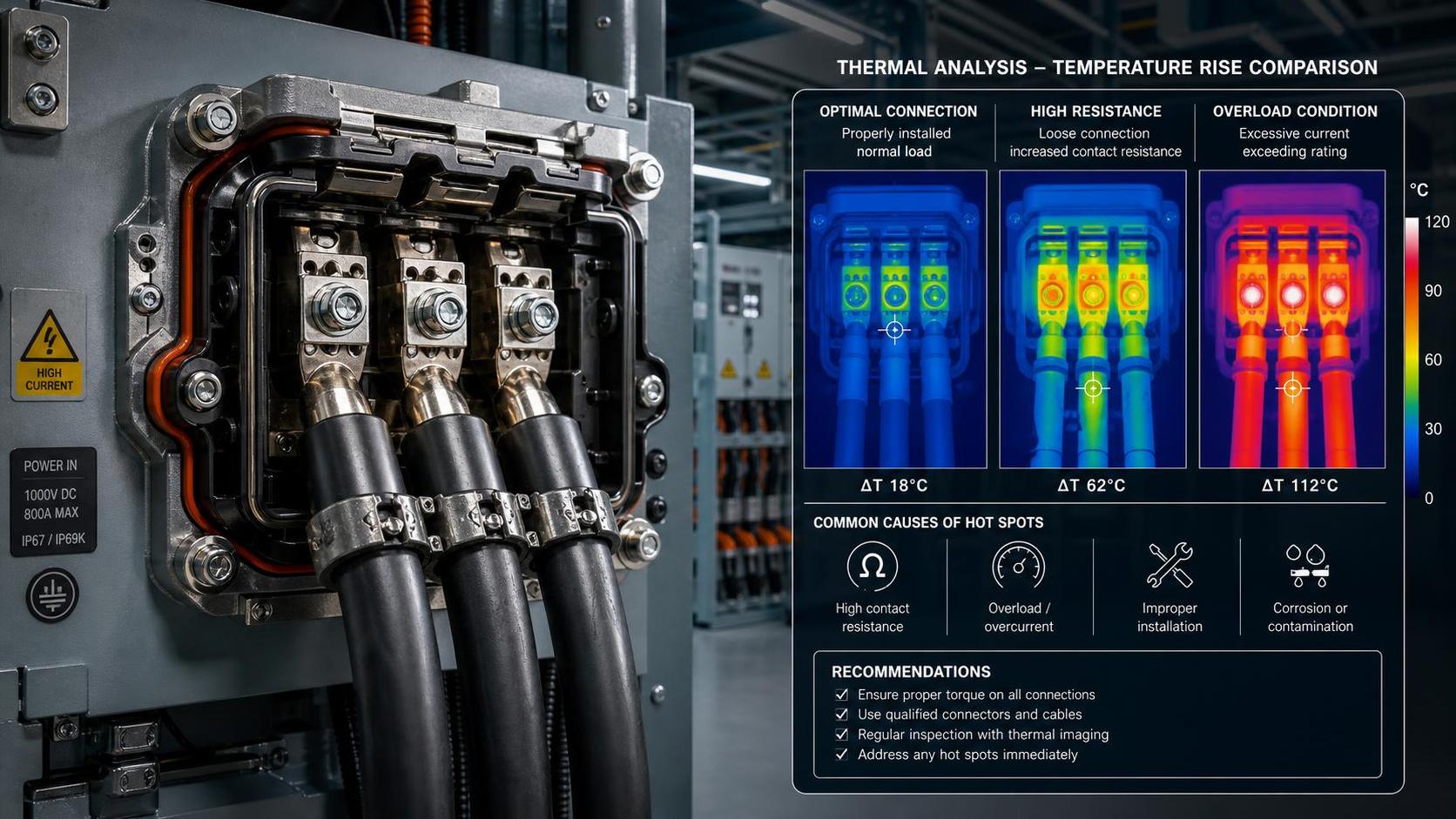
When a high current connector overheats, the root issue is often rising contact resistance. The plastic shell may show damage first, but that is usually the result, not the cause. A connector can look mechanically intact and still run hot if the mating surfaces are worn, oxidized, or not fully engaged.
- Check for darkening, pitting, or a dull film on contact surfaces.
- Look for uneven heating between phases or poles. One hot point usually means a local resistance problem, not a system-wide overload.
- If the connector has been unplugged and re-mated many times, review the rated mating cycle from the manufacturer document if available. Excess wear is a real field issue, especially in maintenance-heavy environments.
A useful rule from field work: if the cable is cool and the connector interface is hot, suspect the contact path first.
Do not underestimate loose terminations
Loose crimp barrels, under-torqued screws, and conductor strands not fully captured inside the terminal cause a large share of overheating incidents. This is especially common after emergency repairs, cable replacement, or work done in poor access conditions.
What to verify on site:
- Pull back the insulation support and inspect whether strands were nicked or cut during preparation.
- Confirm the conductor size matches the terminal range. A connector rated for high current can still fail if the cable is undersized or badly terminated.
- Recheck torque against the supplier’s installation guide where one exists. If you do not have the value, mark it as 【待核实】 rather than guessing.
After-sales teams often inherit connectors installed by others. That is why “newly replaced” should never be treated as “correctly installed.”
Heat can be created by contamination long before failure is visible
Dust, oil mist, salt spray, coolant residue, and moisture all change connector behavior. In heavy industry, transport equipment, and outdoor power systems, contamination often starts as a sealing problem and ends as thermal damage. Even small deposits can interfere with stable contact pressure or create tracking on insulating surfaces.
Pay attention to the operating environment rather than treating every failure as a pure electrical fault. If a connector sits near vibration sources, washdown areas, or temperature cycling, inspect seals, backshells, and cable glands as part of the same job. Cleaning helps, but repeated contamination usually means the protection level is wrong for the location or the sealing components were reused when they should not have been.
Rated current is not the same as real-world current
One mistake seen in maintenance records is assuming the nameplate current rating guarantees safe operation in every installation. It does not. Actual heating depends on ambient temperature, duty cycle, conductor size, bundling, ventilation, and how many adjacent circuits are carrying load.
If overheating appears only during peak operation, check the load profile before condemning the connector. Look for current spikes, longer run times than the original design expected, or equipment upgrades that increased demand without changing the connection hardware. This comes up often when older systems are repurposed or expanded.
Where possible, compare measured current and surface temperature trend under stable load. Absolute pass-fail temperature limits depend on connector design and insulation class, so use the manufacturer’s data when available and avoid inventing thresholds.
Misalignment and partial mating are quieter problems than overload
Some of the worst overheated high current connectors were never fully seated. The equipment still ran, so nobody suspected the interface. Vibration then made the problem worse. This is common on connectors that require a clear locking step, especially when access is awkward or operators are wearing gloves.
- Check that locking hardware is fully engaged and not cracked.
- Inspect for witness marks showing skewed insertion.
- Do not force connectors that feel tight for the wrong reason. Bent contacts and mis-keyed mating can create heat without immediate open-circuit failure.
Use inspection tools that match the fault you are chasing
A quick visual check is useful, but not enough once the failure repeats. Infrared thermography is practical for comparing similar connectors under load. A micro-ohm or low-resistance measurement can help identify abnormal contact resistance during planned maintenance, provided the test method matches the connector design and the circuit is safely isolated. For recurring issues, trend data matters more than one isolated reading.
Also check surrounding components. Heat from busbars, breakers, or nearby power electronics can be misread as connector failure. You want the actual source, not the hottest visible part.
Replacement parts need more than a matching shape
After-sales teams sometimes face urgent substitutions, but a connector that physically fits may differ in contact plating, temperature rating, ingress protection, or approved cable range. If the original part was selected for a harsh environment, a visually similar replacement can shorten service life fast.
If compliance matters in your market, review the exact product documentation for the installed model. Standards and certifications vary by application and region, and they should be checked against the supplier file rather than assumed from catalog language.
What usually prevents repeat overheating
The fixes that hold up are rarely complicated: use the correct cable and terminal combination, follow the specified crimp or torque method, protect the interface from contamination, confirm full mating, and inspect connectors under real load instead of only during shutdown. Add a simple service record with date, load condition, observed temperature difference, and any re-termination work. That record becomes valuable the second time a similar fault shows up.
For maintenance crews, the practical mindset is straightforward. Do not treat overheating as a single-cause problem. In high current connectors, heat is usually the final symptom of several small misses stacking up: a little looseness, a little contamination, a little overload, and one installation shortcut too many. Catch those early, and most connector failures stop being surprises.
Technical Specifications
- How to test melt flow consistency in batches of recycled plasticsAuthor :Polymers & Rubber Editorial Team
- When does a cast resin transformer need high-altitude derating?Author :Electrical Components Editorial Team
- How to verify Global Industrial Insights sourcing informationAuthor :Industrial Machinery Editorial Team
Expert Insights

Chief Security Architect
Dr. Thorne specializes in the intersection of structural engineering and digital resilience. He has advised three G7 governments on industrial infrastructure security.
Core Sector // 01
Security & Safety
- What to check when sourcing industrial connectors from GermanyAuthor :Electrical Components Editorial Team

- When DIN rail terminal blocks need end stops to prevent looseningAuthor :Electrical Components Editorial Team

- How to Evaluate a Terminal Blocks Supplier for Quality and Lead TimeAuthor :Electrical Components Editorial Team

- High Current Connectors: Common Failure Causes and How to Prevent OverheatingAuthor :Electrical Components Editorial Team

- Terminal Blocks Selection Guide for Reliable WiringAuthor :Electrical Components Editorial Team

- Industrial Connectors Explained: Main Types, Ratings, and Typical ApplicationsAuthor :Electrical Components Editorial Team

- How to Choose Connectors for Vibration, Moisture, and Repeated Plugging CyclesAuthor :Electrical Components Editorial Team